
atmina

Citations that point inward

A citation that names a line range opens the file at exactly those lines — true everywhere except one place. When the lines being cited sat in the document you already had open, the range quietly went missing and the citation did nothing at all. A document could reference every file in your knowledge base except itself.

That gap is closed. A reference to a passage now behaves the same way whether it points across your knowledge base or at the paragraph above it.

Improvements

  • A citation to a line range in the file you already have open now opens that range in place, scrolled to the cited lines and highlighted, exactly as a citation to any other file does
  • The citation names where it goes before you follow it, spelling out the file and the exact lines, whether you hover it or hear it read aloud

Follow a thread through your knowledge

Knowledge is only as useful as your ability to move through it. This release makes the paths between your files real: a citation opens at the exact lines it cites, a link says plainly whether anything is behind it, and the menus and indexes that hold a wiki together can now be generated from the files themselves.

It also opens your own vocabulary to search. A knowledge base can declare which of its frontmatter fields matter, whether that is a year, a status, a sequence number, or a category, and then filter, sort, and group by them. Atmina doesn’t impose a taxonomy on your material; it queries the one you already wrote.

Improvements

  • A citation that names a line range now opens the file scrolled to exactly those lines with them highlighted, and the link keeps working when you share it or reopen it days later
  • Links between memories now tell you what they are: a live one names the memory and the exact path it opens, while a link with nothing behind it becomes plain text showing the path that would have matched
  • Links that were never going to resolve, such as an empty target, a folder, something outside the knowledge base, or the page you are already reading, are marked as ignored rather than reported as broken
  • Each knowledge base can declare its own frontmatter fields as queryable, then filter search and file listings on them with typed comparisons: “every event in year 1163,” “decisions recorded after March,” “chapters between 12 and 20”
  • A filtered file listing is exhaustive, while filtered search narrows the strongest matches for your query — and the answer now says which of the two you received
  • Atmina can generate a Markdown index for any folder, with every link exact and written relative to where the index lives, ordered alphabetically or by one of your declared fields
  • Wiki menus can be generated from your folder structure, with pages optionally grouped by one of your fields, while sections you wrote by hand keep their content, their comments, and their place in the order
  • Generated indexes and menus preview by default and only ever rewrite the block they own, so prose you wrote around them is never touched
  • Every memory now shows its linked memories beside “Linked from”: what it links out to, what links back, and, listed separately, the references that no file backs yet
  • All of it is reachable the same way through the app, the API, and connected agents

Search that says when something went wrong, and chats that never hang on a slow lookup

Two reliability improvements land in this release. When a search can’t reach every part of your knowledge, the results now say so plainly — a shortfall is no longer dressed up as “no matches.” And in chat, one slow lookup can no longer freeze the whole conversation: the assistant notices, says what happened, and keeps going with what it has.

Improvements

  • Search results now distinguish “nothing matched” from “part of your knowledge couldn’t be reached” — and say which one happened
  • The activity record behind every search now keeps enough detail for support to see exactly what degraded, so intermittent search issues can be diagnosed after the fact
  • A chat turn no longer stalls behind a single slow lookup; each step now has its own time budget, and the assistant explains when one runs out instead of hanging
  • Chat answers arrive faster in the worst cases: the previous behavior could hold a turn for a full minute before giving up silently

Granular team permissions

You can now decide who on your team can see each knowledge base, and what they can do there. Until today, everyone in a team could see every knowledge base that team owned, which is why the most sensitive material tended to stay out of Atmina altogether. Now each knowledge base is either open to everyone in the team, or shared with selected people at view, edit, or manage level.

Everything you already have keeps working exactly as it does now: every existing knowledge base stays open to its whole team until you decide otherwise. Newly created knowledge bases start private to your team’s admins, so you can add content before choosing who sees it.

Improvements

  • Choose “Everyone in the team” or pick selected people, for each knowledge base
  • Give a teammate view, edit, or manage access, or a read-only lens
  • New knowledge bases start private to team admins until you share them
  • Changing a knowledge base from “everyone” to selected people asks for confirmation first, and warns that assistants using it may need their setup adjusted
  • The people view now shows what each person can actually reach, rather than what their team role implies
  • Team owners and admins always keep access to everything their team owns
  • Works the same through the app, the API, and connected agents

Bug fixes

  • The team sharing overview (every shared knowledge base and its collaborators) is now visible to team admins only, matching every other team management view

Build a knowledge menu around your work

Knowledge bases can now define their own Menu, so a consulting engagement, onboarding guide, operations handbook, or sales playbook can put the right pages in the right order without adopting a software-wiki folder structure.

Add wiki/nav.yaml to choose the sections, page order, and labels people see in the reading view. Menu entries can point beyond the wiki folder to files elsewhere in the knowledge base, while the existing structured-wiki menu continues to work when no custom menu is present.

If a menu file cannot be read or does not produce a usable menu, Atmina falls back safely to the existing structured menu or folder view instead of leaving readers stranded.

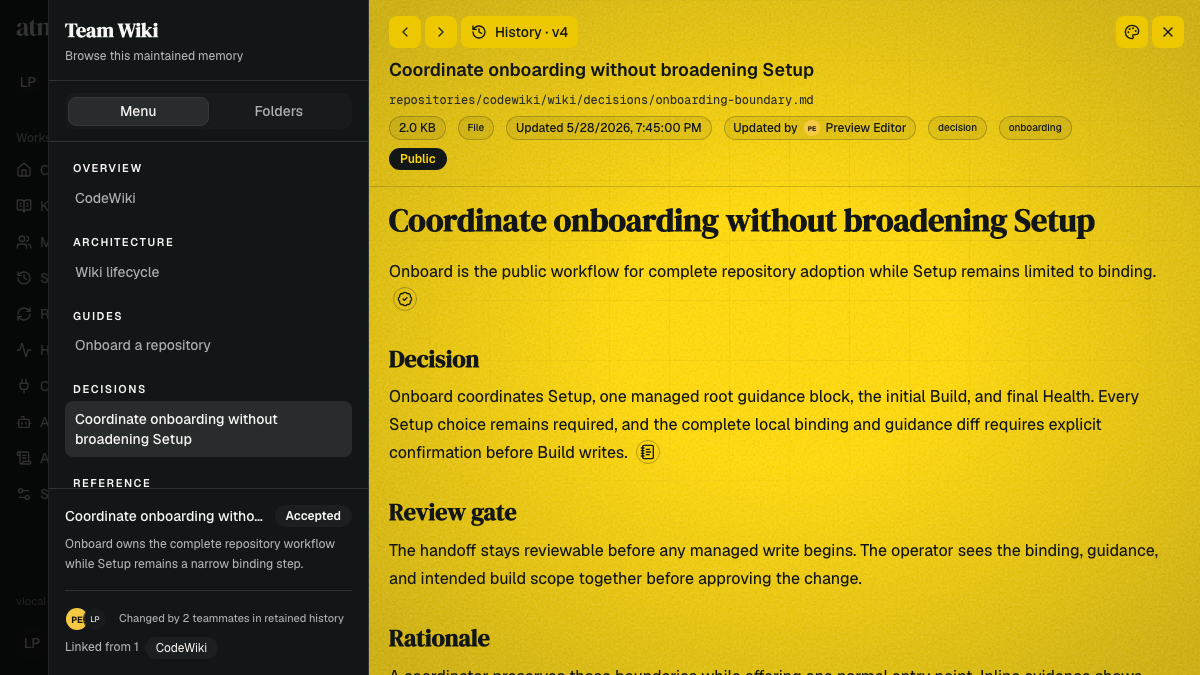
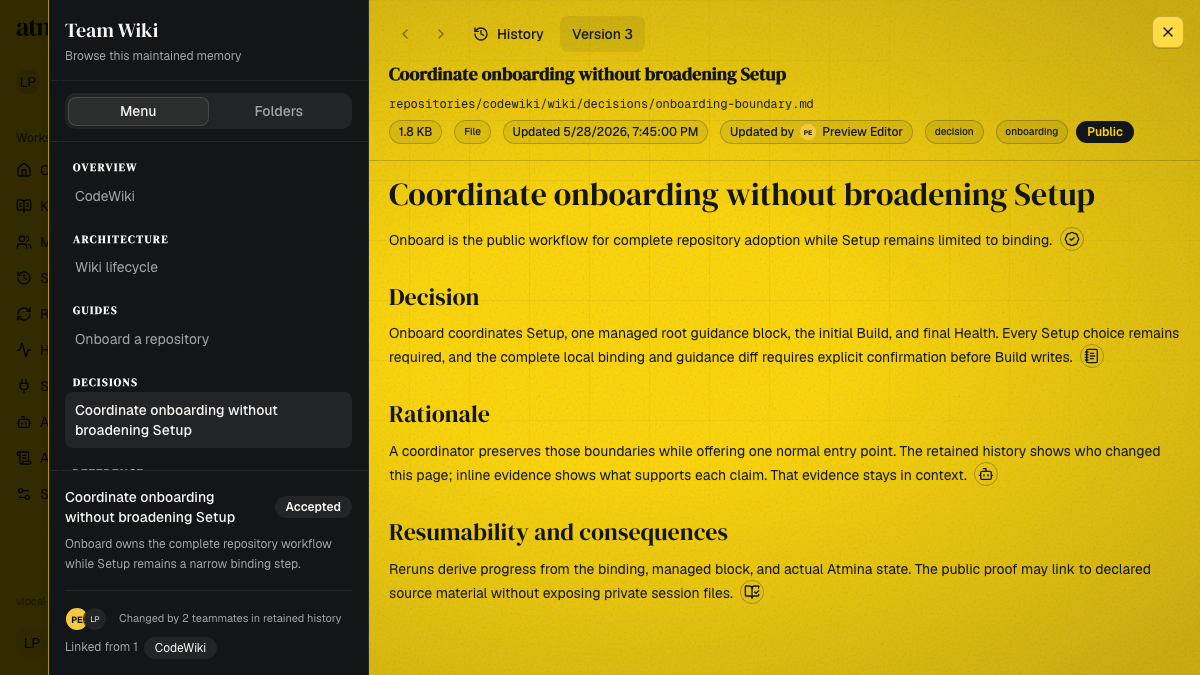
Atmina Team Wiki showing a structured page menu, a selected decision document and inline evidence markers on the yellow reading surface

Read team knowledge with its evidence

Team knowledge now opens in a wiki-style reader that keeps its structure in view. Structured knowledge bases show a document menu, while other collections retain their folder tree, with the current file highlighted as you move between pages.

Evidence markers sit beside the claims they support. Open one to see whether its support came from another wiki page, an accepted decision, a repository location, an official document, or a privacy-preserving agent session. When the evidence identifies another file, you can open it directly.

History, contributors, backlinks, visibility, file origin, and the current version now share the same reading surface, making maintained knowledge easier to explore without losing where it came from.

Keep support conversations together

Support requests now have a home in Atmina. Open Support → My support requests to review what you reported, see its current status, and continue the conversation with Atmina support. Your requests stay available across all of your teams.

After reporting a problem, the confirmation screen now links straight to the new request. The conversation keeps your original report, screenshots, and follow-up messages together, while new replies bring the request back to the support team's attention.

Email is part of the same conversation too. Confirmation and update messages remain grouped in one thread with a short recent history, and you can reply directly from your email or continue in Atmina. Either path adds your message to the support request.

The Support menu and affected request rows now show when Atmina support has replied or changed a request's status. Opening the request clears the update indicator after you have seen it.

Safe writes are now standard

Since v0.177.0, every file in your team's memory keeps its history, and agents have been able to attach a fingerprint of the version they last read when updating a file, so a stale update is rejected instead of silently overwriting newer work.

That protection is now standard. When an agent replaces or edits an existing file, Atmina requires the fingerprint: an update without one is declined with a clear message telling the agent to re-read the file and try again with what it learned. Creating new files and appending to existing ones work exactly as before.

Nothing changes in the dashboard, and nothing is required from you. Agents following the built-in write guidance already do this; older scripts that overwrite blindly will now receive that corrective message instead of clobbering a teammate's work.

Version history for your team's memory

Every memory file now keeps its history. Each time a person or an agent updates a file, Atmina records who wrote that version, when, and from which session, and preserves the previous content instead of overwriting it.

Open any file in the Workbench and choose History to see its timeline, view an earlier version, compare it with the current one, and restore it with a click. Restoring never rewrites the past: it creates a new version with full attribution, so the record of what changed stays intact.

Agents get the same powers through recall: they can list a file's history, read any retained version, and roll back when an update turns out worse than what it replaced.

Writes are also safer when many agents share one memory. Agents can attach a fingerprint of the version they last read to their update; if someone else changed the file in the meantime, Atmina rejects the stale write and hands back the current fingerprint so the agent can re-read, redraft, and retry. No more silent lost updates.

Atmina keeps the twenty most recent versions of each file. Nothing about your existing files changes until their next edit, when history begins recording automatically.

Sign in with Microsoft

You can now sign in to Atmina with a Microsoft account. Both kinds work: a work or school account from your organization's Microsoft 365 tenant, and a personal Microsoft account.

If your team already knows you by your email address, signing in with Microsoft joins up with your existing identity instead of creating a second one. You can review and manage the connection any time from Account settings under Connected accounts, alongside Google and GitHub.

Magic-link sign-in still works for everyone, so nothing changes unless you choose Microsoft.

Instant wiki-link updates and file-level audit trails

Turning wiki-style links on or off now takes effect immediately from every surface. Whether the setting is flipped on the settings page or by a connected agent, Atmina re-reads the memory's files on the spot, so links between memories appear (or retire) without waiting for each file's next update.

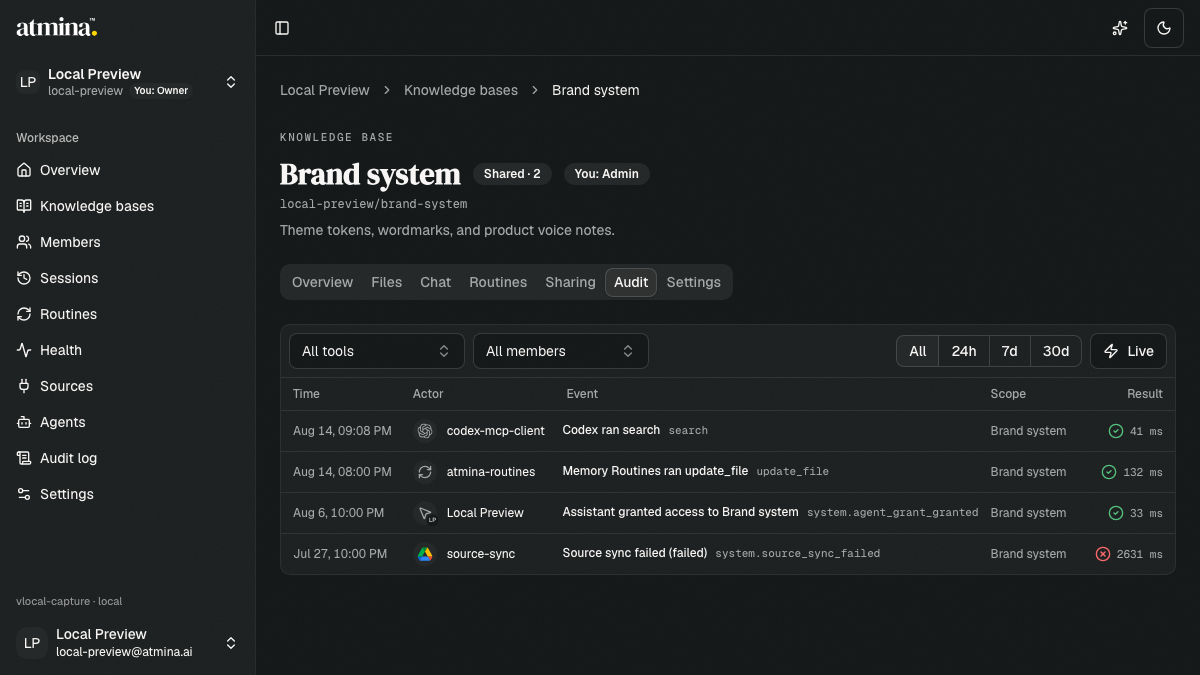
The audit trail now names the exact file behind every file action. Uploads, edits, and deletions each record the specific memory they touched, so reviewing what happened to a single document no longer means piecing it together from tool arguments.

Improvements

  • Single-file batch imports and confirmed uploads record their file on the audit trail the same way direct writes do
  • New release-engineering safeguards catch versioning collisions in our database change history before they can ship

Sign-up fixes, in-app support, and clearer team limits

Joining the alpha waitlist is now far more forgiving. When a submission cannot go through, the form says exactly why: a verification that needs redoing, too many attempts in a row, or an email address that needs a second look. No more single generic error.

You can now report an issue without leaving Atmina. The in-app support dialog captures your report with a category (bug, question, billing, feedback, or other) alongside severity and screenshots, and routes it to the team with the context needed to help quickly.

New teams start with more of Atmina switched on from the first session: Memory Routines, the Pulse default routine, and prompt fragments are now on by default. Alpha accounts begin on the Pro plan; Teams-tier capabilities remain available through a short induction with the team.

Model providers now carry their own identity. Providers can have an icon, a description, and a homepage link, and the model picker shows who serves each model at a glance — with familiar brand marks standing in when no custom icon is set.

Improvements

  • Daily routine run budgeting now reads purely in team terms: owners and admins set an optional daily budget against a clearly stated maximum
  • Support reports sync to the team’s tracker with category and environment tags for faster triage and follow-up
  • Operators can adjust platform-wide feature defaults at runtime from the admin console, with every change audited

Memory that keeps pace with your connected sources

When a Source Sync completes successfully after changing mirrored files, Atmina can now start each subscribed Memory Routine. Current State and Pulse subscribe by default, while advanced settings let you opt routines in or out. Event subscriptions run alongside manual runs and schedules.

Current State and Activity cards on each Knowledge Base Overview now show a concise headline and summary before you open the full artifact. Generated Current State summaries can also appear beneath Knowledge Base names across Team Overview and list screens when no human description is set. Behind these views, the compact presentation can also carry highlights, an optional status, and generation time; opening the card still shows the complete artifact, which remains the source of truth.

Improvements

  • Current State’s promoted Actions companion can be attached as optional artifact context only when an enabled routine declares Actions and the companion passes verified run-lineage checks
  • Event-started runs retain the triggering Routine Event and Connected Source in their provenance; durable per-routine deliveries retry unexpected dispatch failures up to five times and preserve exhausted failures as dead-letter records for operational follow-up
  • More dashboard actions now leave governance records, including file changes, search, chat-session lifecycle, and routine create, update, and delete; routine updates record changed field names rather than instruction or configuration values
  • Operator-only usage reports now provide clearer person, team, Knowledge Base, and request-level attribution, plus visibility into activation, engagement, route health, and model usage

Faces and logos everywhere, so you can see who did what at a glance

Every place Atmina names a person, a team, or a connected source now carries a recognizable face or mark. Profile photos flow through the audit log, activity feeds, files, and chat; teams get an uploadable logo that follows them across the product; and connected sources like Linear and Google Drive show their real brand marks instead of a generic plug icon.

Improvements

  • The audit log and activity feeds show each person’s profile photo (initials only when no photo exists), and source syncs lead with the connector’s real mark, aligned with every other row
  • Teams can upload a team logo in Settings; it appears in the team switcher, the team overview, shared knowledge-base cards, and the operator console
  • Linear and Google Drive show their true brand marks across Sources, the connect catalog, member connections, chat citations, and health cards
  • File previews show who last updated a file, and routine runs show the person who ran them rather than a raw identifier
  • Your own chat messages carry your photo, and the agents allowed to act as you lead with their brand marks
  • Sharing panels, invitations, and member-removal confirmations lead with identity faces, so you always confirm the right person
  • Sign-in buttons carry the Google and GitHub marks

"Your first day in Atmina: a welcome, guided first steps, and help inside the product"

Signing in for the first time now starts with a proper welcome: two sentences on what Atmina is, one question about how you mainly work (with an AI coding tool, or in the browser), and a direct line to the founder. Your answer shapes the first steps you see, and you can change it any time in Account.

From there, Atmina guides you to your first recall. Browser-first members land in a Knowledge Base with the Atmina guide already in place, so the first question has a cited answer. Agent-first members start at connecting their agent, with a prompt to try from their own tools.

Help now lives in the product. The Atmina Guide is a public Knowledge Base: open it from Help in your menu, follow Learn more links from setup steps, and read about capture, recall, routines, sharing and your data without leaving the app.

When you want a quick orientation, choose Show me around for a short, optional walk through the main surfaces. It appears only when you ask for it.

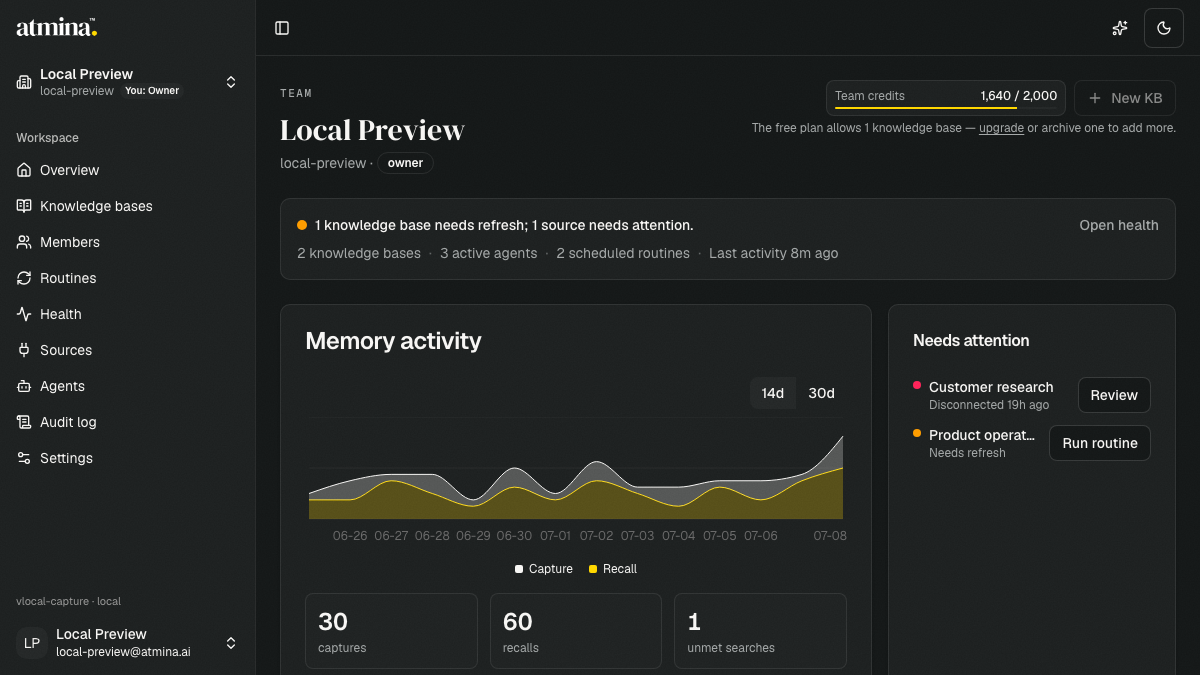
Dark Team Overview dashboard with a memory activity chart, one unmet search, a disconnected source, and a stale knowledge base with a Run routine action

Your team at a glance: the Overview becomes a dashboard

The Team Overview has grown up. Where there used to be a list of Knowledge Bases and a chart tucked at the bottom, the page now answers the three questions you actually have when you land: is memory healthy, what needs my attention, and what happens next. A Team pulse banner gives the verdict in one line; everything below it earns its place.

Improvements

  • A Team pulse banner opens the page with a plain verdict: “Everything is up to date.” or exactly what needs refresh, plus your team’s shape at a glance: knowledge bases, active agents, scheduled routines, and when memory last moved
  • Memory activity gets stat tiles for captures, recalls, and searches that found nothing, under a chart you can flip between 14 and 30 days
  • A Needs attention queue lists disconnected sources and Knowledge Bases awaiting refresh, each with its remedy one click away: review the source, resync it, or run the routine right there
  • Knowledge bases are now a proper table for status, files, recalls over the last 30 days, and last activity, with memories shared from other teams kept in their own quiet list below
  • Next up shows your upcoming scheduled routines in your own timezone, with a source-health summary at its foot
  • Recent activity reads like a story (“codex-mcp-client recalled Personal Memories”, “Customer Notes captured 4 memories”, “Product Research routine completed”) instead of raw tool logs

Under the hood

  • The whole page rides one consolidated team health read. Recall counts, upcoming routines, and active-agent numbers are derived on read from the audit plane, with no new stores and no schema changes
  • Read-only observers see everything their lens covers and nothing it doesn’t. Source details stay hidden, and every count is scoped to the Knowledge Bases they can watch
  • Brand-new teams keep a quiet page: the analytics grid stays out of the way until there is real activity to show
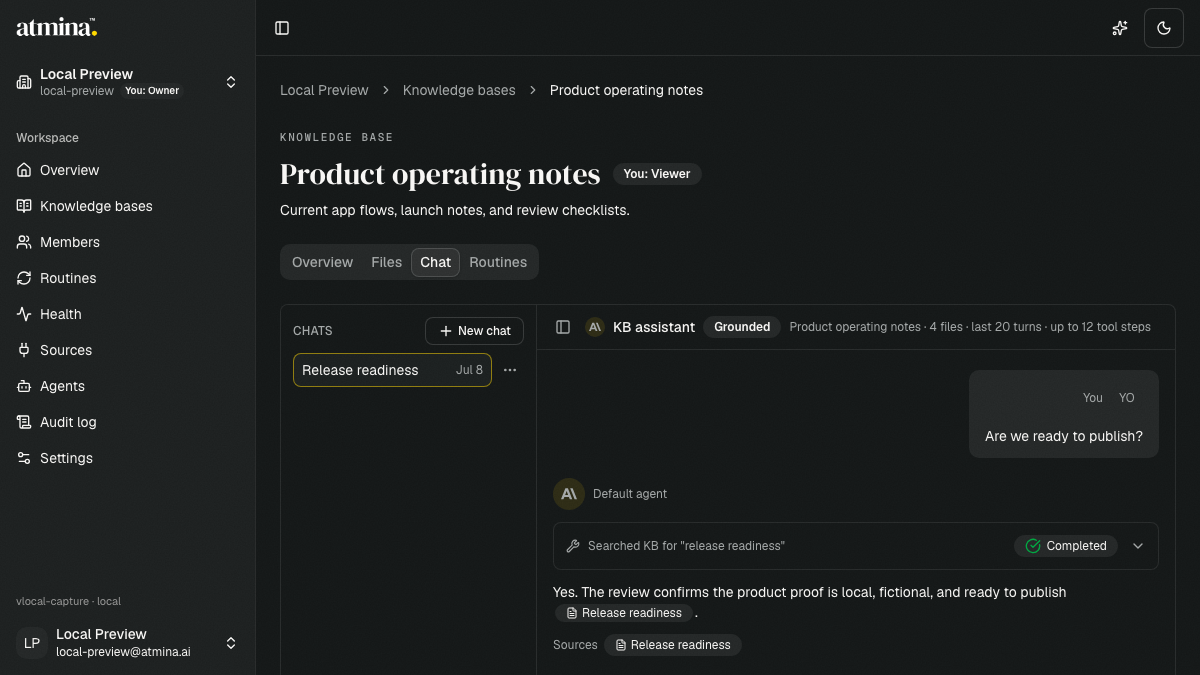
Dark Atmina chat with a saved release-readiness conversation, completed knowledge base search, grounded answer, and visible source citation

Sources you can touch, and a memory that offers to keep notes

Three quality-of-life upgrades land today, all about trust and continuity. Chat answers now wear their sources on their sleeve: every reply grounded in your Knowledge Base shows source pills you can hover for provenance (the file, a matching snippet, how it matched, and where it synced from) and click to open in place. Your connected assistants also learn a tidy habit: at the natural end of a working session they offer to save a short session note of what was decided and what’s still open. Nothing is written unless you say yes. And for teams who write notes the wiki way, a new per-memory setting recognizes [[double-bracket]] links alongside the Markdown links Atmina already understands.

Improvements

  • Chat answers show their sources as pills beneath the reply. Hover for the file, snippet, and match strength; click to open the source in place without losing the conversation
  • References the assistant makes inside its answer light up as the same pills, linked to the same sources
  • Files the assistant read in full appear alongside search matches, so the grounding you see is complete
  • Assistants offer to capture a brief, dated session note at the end of a working session. It is only written when you agree, then folded into your memory’s running summary like any other file
  • “What did we decide last Tuesday?” just works because session notes carry their date in the filename, so recall-by-date needs no extra bookkeeping
  • A per-memory “Wiki-style links” setting recognizes `[[double-bracket]]` references. Open the target in place, see what links here, and spot references to notes that don’t exist yet

Under the hood

  • Wiki-style links are off by default, per Knowledge Base, and never rewrite your files. The setting only changes how text is read; turning it off removes those connections again
  • Session notes are a convention, not a mechanism: ordinary searchable files under `journal/`, with the same integrity checks as every other write
  • Source pills reuse the provenance already captured at retrieval time, with no new data collection or model changes
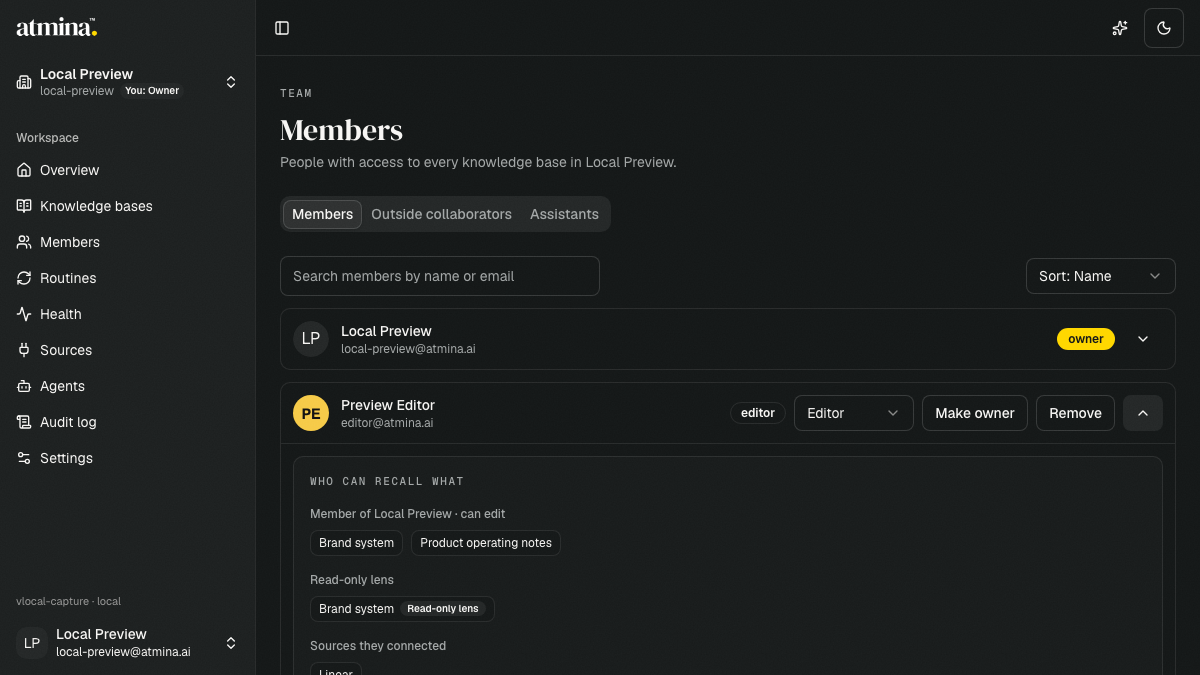
Dark Atmina Members page with Preview Editor expanded to show team knowledge bases, a read-only lens, and connected sources

Your team, with faces

The Members page grows into a real home for your team. Profile photos arrive everywhere your people appear, every member expands into a clear picture of who can recall what, and assistants get their own place alongside the humans they answer to.

Improvements

  • Profile photos: if you sign in with Google or GitHub your photo just appears; everyone else can upload one from Account → Profile, with initials as the graceful fallback
  • Expand any member to see exactly what they can reach: their role, every Knowledge Base they can view, edit, or manage, read-only lenses, and the sources they’ve connected, with a one-click jump to their activity
  • A new Assistants tab shows every assistant, who’s responsible for it, and which Knowledge Bases it can reach. Grant or remove access right there
  • Outside collaborators now read person-first, with one row per person however many Knowledge Bases they’re in. Read-only lenses finally show up and can be removed, which was not possible before
  • Share a Knowledge Base as a read-only lens straight from the sharing panel, by picking a teammate
  • Member management essentials: resend an invitation in one click, search and sort the roster, and use a remove dialog that tells you honestly what stays behind, with the option to remove their Knowledge Base access too
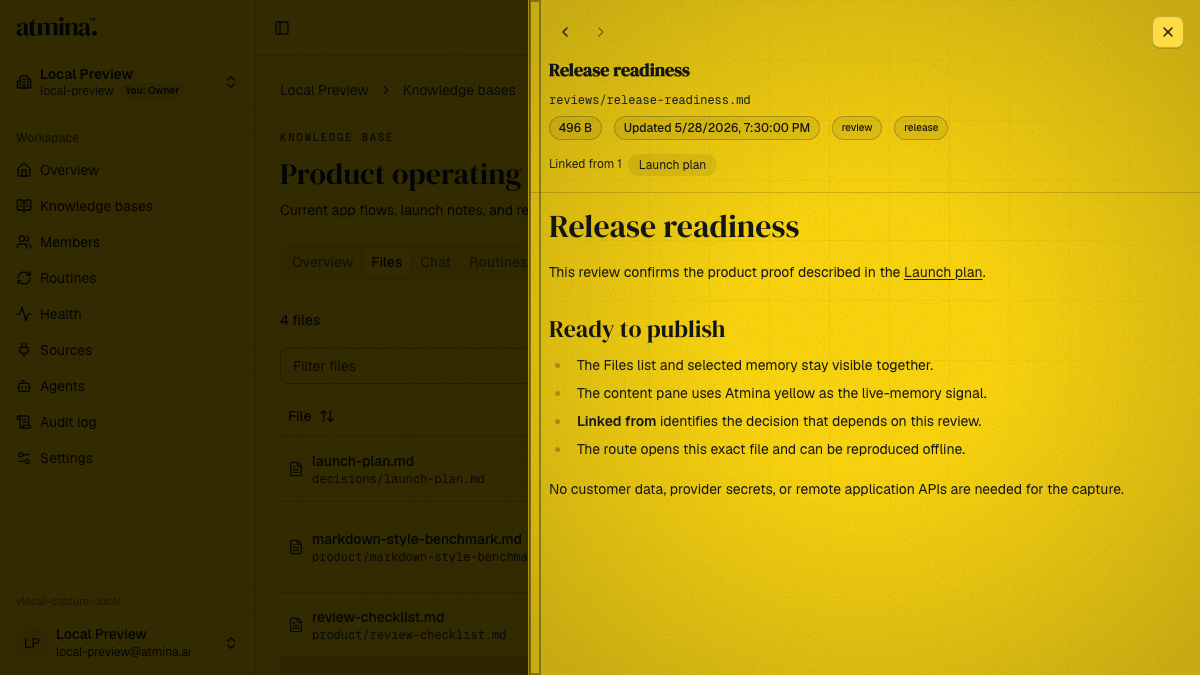
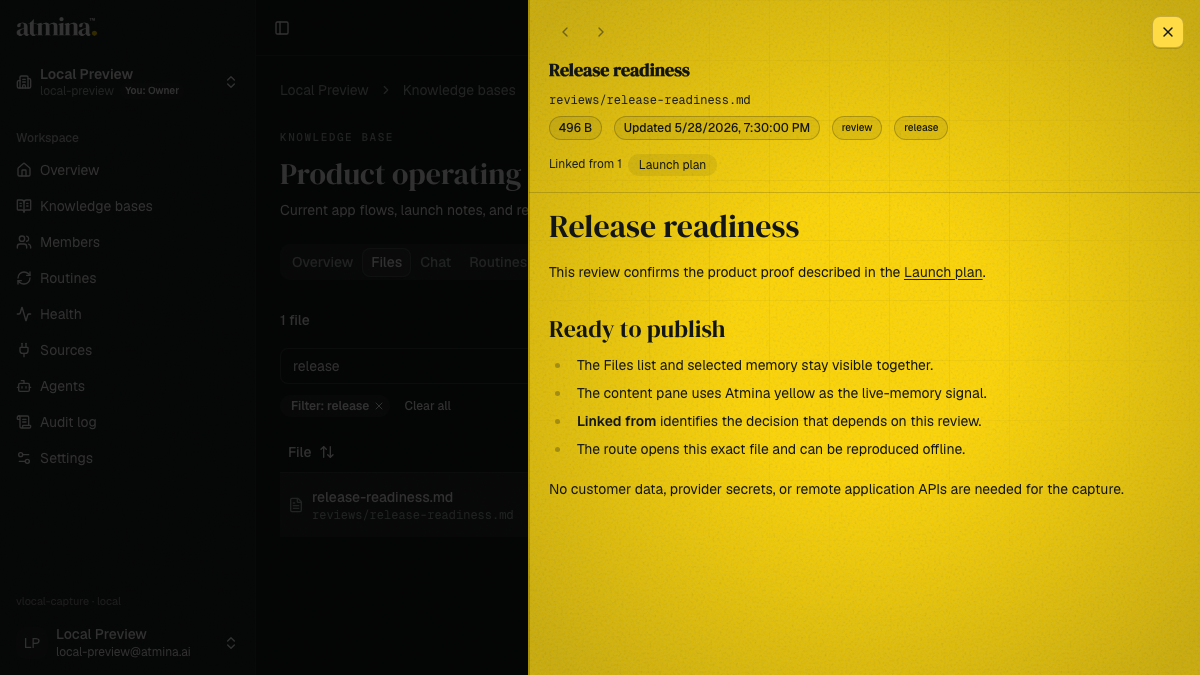
Atmina Files workbench with Release readiness open in the yellow content pane and a Linked from backlink to Launch plan

Linked memories: your files now point to each other

A memory rarely stands alone. From today, when one file in a Knowledge Base references another by its path (plain Markdown, nothing new to learn), Atmina notices. Click the reference and the file opens right there in the reading pane. Open any file and see what points back at it. And your compiled Current State now shows its receipts: expand “Built from N sources” and open exactly the files it was distilled from.

Improvements

  • References between files in the same Knowledge Base are now live: clicking one opens the target in the reading pane instead of going nowhere
  • “Linked from” on every previewed file lists the files that reference it, one click from each
  • A reference to a file that doesn’t exist yet stays visible but quiet (“not in this memory yet”) and comes alive the moment the file is written
  • Current State shows “Built from N sources”: the exact files each compiled summary drew on, verified against the run that produced it
  • Agents see the same connections: a file’s outline now carries what it links to and what links here, so they can walk the neighbourhood of an answer instead of searching again

Under the hood

  • Connections are read out of your files, never written into them. Delete the index and it rebuilds to the identical result from the files alone
  • Content that arrived from synced external sources never steers these surfaces; only your team’s own writing links by default
  • The new per-KB connections view is for signed-in members only, with honest coverage reporting while older files are still being indexed

Connect your own sources when your team owner says go

Until now, only admins could plug external sources into the team’s memory. Today the team owner can hand members the keys, integration by integration: open the Sources page, search the catalog, pick a Knowledge Base, and connect. Authorization happens right in the app, and the connection comes alive the moment you approve.

Improvements

  • Team owners choose which integrations members may connect on their own through a per-integration switch under “Member connections” on the Sources page
  • A searchable source catalog replaces the fixed picker; every entry says plainly whether you can connect it or an admin manages it
  • Authorization now opens inside the app and the source activates automatically when you finish. There is no more “open a tab, come back, click complete” (a manual finish stays one click away if you close the window early)
  • Members with editor access can connect enabled workspace sources into their team’s Knowledge Bases; syncing and disconnecting stay with admins
  • Every new connection is recorded in the team’s activity trail, with who connected what into which Knowledge Base

Under the hood

  • Sources that carry personal data stay admin-only until private personal spaces ship; an owner switch can’t override the platform’s co-mingling guardrail
  • Connect sessions now carry team and member identity end to end, laying the groundwork for per-person sources
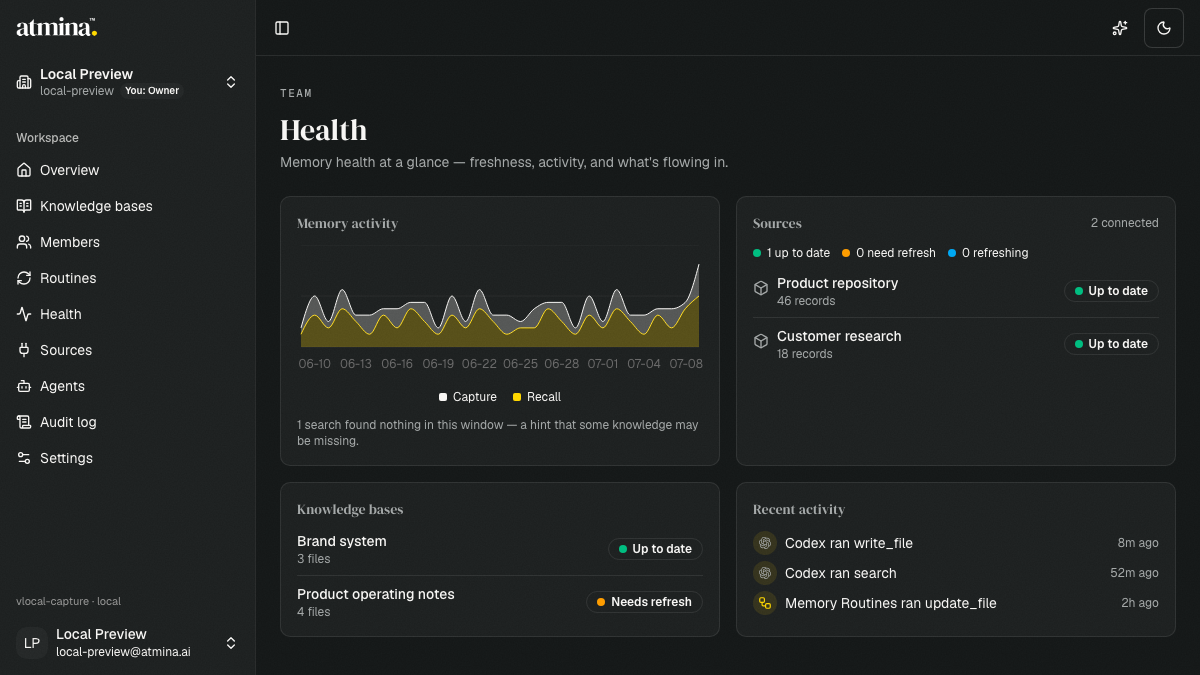
Dark Atmina Team Health dashboard showing memory activity, source health, knowledge base freshness, and recent activity

The read-only lens, and assistants with guardrails

Your company brain learns who may recall what. You can now share a Knowledge Base as a read-only lens, perfect for oversight without the risk of an accidental edit. Assistants carry their own explicitly granted reach, always bounded by the human responsible for them. A new Health page shows how your team’s memory is doing, across every team you run.

Improvements

  • Share a Knowledge Base as a read-only lens: recipients can search, read, and follow its activity, but can’t change a thing
  • A new team Health page brings sources health, Knowledge Base freshness, and memory activity together in one place; read-only lens holders see exactly their slice, clearly badged
  • Run several teams? A combined view rolls up health and activity across all of them, with per-team drill-down
  • Your recent activity: a personal feed on your Account page shows what you did across every team and shared Knowledge Base you touch
  • Assistants with guardrails: grant an assistant access to specific Knowledge Bases, bounded by what its responsible human can see. Revoke either side and its reach shrinks on the very next reply
  • Source syncs now leave a clear trail with the exact source attached, and paid teams keep their history around twice as long

Under the hood

  • One access-grant spine now records every “who may recall what” decision, laying the groundwork for per-person sources and your private annex
  • Model availability now honestly follows each team’s plan, everywhere models appear
Atmina Files workbench filtered to a fictional release review with the selected file open in a yellow preview pane

Files grows up: folders, filters, and previews

The Files tab in every knowledge base has grown from a simple list into a real workbench for inspecting what your agents and sources have remembered. Browse folder by folder, narrow long lists in a keystroke, and preview anything readable without ever losing your place.

Improvements

  • Files now browse like folders: a folder view with counts and breadcrumbs, built straight from your file paths
  • A filter box narrows by name, path, or tag, with quick facets for type, tag, date, and searchability. Active filters show as chips you can clear in one click
  • Every readable file has a clear Preview action, and you can step to the next or previous file without closing the pane; JSON, YAML, code, and logs now preview as code while Markdown stays rendered
  • The exact folder, sort, view, and previewed file live in the link. Copy the URL and a teammate sees exactly what you see, and back/forward finally behaves like a file browser
  • System-managed files explain themselves in plain language (source mirrors, compiled memory, staged drafts), and anything that can’t be opened says why
  • New columns show when something happened and where each file came from: written by an agent, mirrored from a connected source, or compiled by a routine
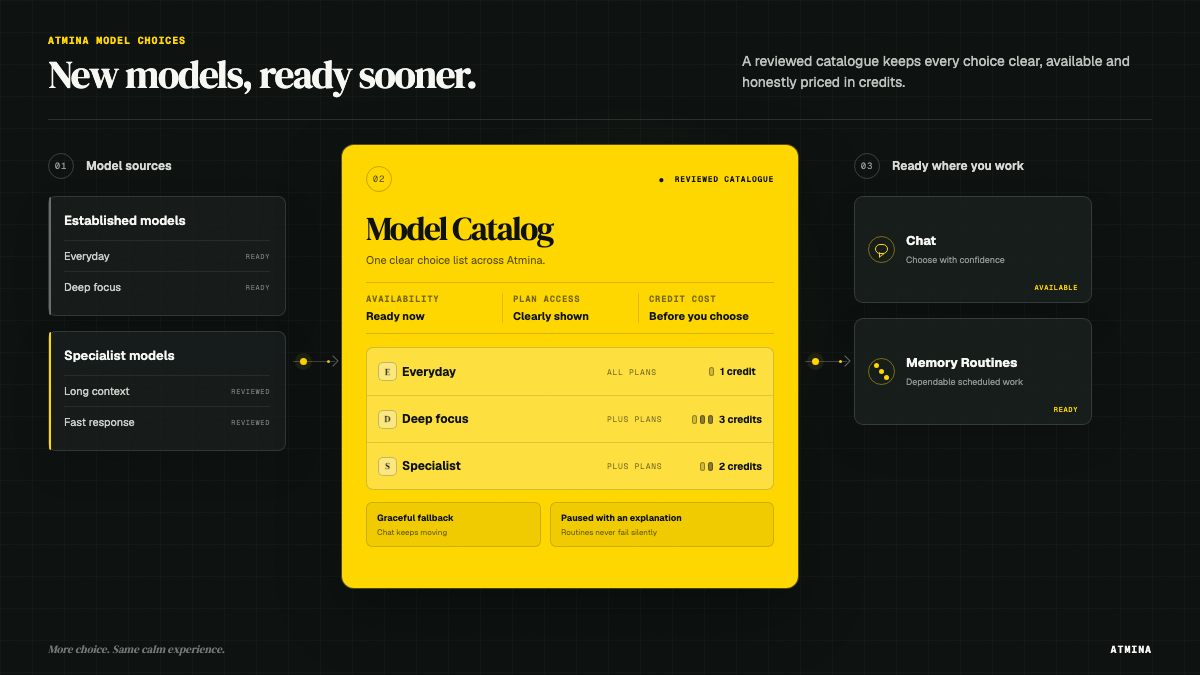
Established and specialist models flow into a reviewed Model Catalog showing availability, plan access and credit costs, then out to Chat and Memory Routines

New models, sooner

Atmina’s model lineup can now grow much faster. New models, including ones from smaller specialist labs, can be tested, priced in credits, and made available in your picker in minutes rather than waiting for an app release. Availability still respects your plan, prices stay in honest credits, and everything you already use keeps working exactly as before.

Improvements

  • The model menu in chat, agents, and routines can gain new options the moment they’re ready, with no update needed on your side
  • Every new model arrives with credit pricing set from day one, with the same cost indicators you know
  • Models from specialist providers can join the lineup alongside the established ones
  • If a model is ever withdrawn, chat falls back gracefully and routines say why they paused; nothing fails silently

Connect Linear, and see where every answer comes from

Your team’s shared memory now draws on more than the documents you upload. Connect your Linear workspace, and its issues, projects, and the context around them flow in alongside your files — and wherever the assistant answers you, in chat or agent search, each piece of context now shows which source it came from, so you can see at a glance whether an answer leaned on your documents or your Linear workspace, and trust it accordingly.

Improvements

  • Linear as your first named Connected Source — connect a workspace, and its issues and projects join your team’s shared memory alongside your documents
  • Source attribution on every answer in chat and agent search, so you can see exactly which source each piece of context came from
  • Routines you can scope to chosen sources, so a scheduled brief draws from just the ones you pick
  • A dashboard view of each connected source’s freshness and sync status, so you know how current your memory is

Credits get a balance, and a safety net

Your team now has a monthly included credit allowance, shown as a live balance with gentle warnings well before it runs out. When the balance reaches zero, chat pauses with a clear message, and scheduled routines skip their run and mark the knowledge base as awaiting refresh — everything resumes on its own once credits are back. No surprise overruns, ever.

Improvements

  • A live credit balance and monthly allowance on your team page, with early warnings
  • Out of credits? Chat says so plainly and points you to your billing page
  • Routines never fail silently: a skipped refresh says why, and catches up automatically on the next run
  • Credit packs are wired up behind the scenes — buying more credits from your billing page rolls out next

Support that closes the loop

Reporting an issue now starts a real conversation. When you send a report from inside the app, we can reply to you directly by email. You’ll see the same reference number on both ends, so nothing gets lost in between. Behind the scenes, reports that hit a delivery hiccup now retry themselves, and when we resolve an issue on our side, its status follows automatically.

Improvements

  • Replies to your in-app reports arrive by email, tied to your ATM reference number
  • Reports are delivered reliably: transient delivery problems retry themselves without you noticing
  • When we fix something you reported, its status updates automatically instead of going quiet
  • A new hardened operations console, protected by a second authentication factor, lets us answer account and access questions much faster
  • Groundwork for quicker alpha onboarding: invitations and access changes no longer wait on manual steps

One model menu, priced in credits

Chats, agents, and routines now share a single curated menu of models — the same tested lineup, names, and badges everywhere you choose one, each with a simple cost indicator. And usage now speaks one honest language: credits. Every AI action shows what it used, even on the lightest models, so nothing looks deceptively free.

Improvements

  • One model picker across chat, agents, and routines, backed by one tested lineup with sensible defaults
  • Usage is shown in credits everywhere: run history, run details, and your team usage page
  • Team usage adds up per model, in credits, with clear model names
  • A run that fails now says so honestly — no more quiet zero-cost entries
  • Groundwork for connecting boutique model providers beyond the core lineup

Sharper answers about recent meetings, and a smarter start

The assistant is now dependable for “what’s the latest?” and “show me the last few” questions. It orders documents by the date each one is actually about (the day the meeting happened), rather than when the file was added, so recent-first answers come back complete and in the right order. And every conversation now opens with the assistant already aware of what a knowledge base holds, so its first answer lands on target instead of guessing.

Improvements

  • “What’s the latest meeting?”, “the last 10”, and date-ordered questions now answer by the date each document is about; nothing recent is skipped or mis-ordered
  • The assistant starts each chat already oriented on a knowledge base’s current summary, for a relevant first answer
  • Clearer results: a match found by a document’s title or path now says so, instead of a confusing “0% match”
  • Ask “what’s in this knowledge base?” and the assistant can pull the current summary on demand
  • Date-ordered file listing is now consistent across the app, the API, and connected agents

Your data, on your terms

This release puts the full life of your data in your own hands. Restore a knowledge base you archived earlier, download a complete copy of a knowledge base, a team, or your whole account whenever you need it, and permanently erase what you no longer want to keep — all without contacting support.

Improvements

  • Restore an archived knowledge base in one step, from a new Archived view in team settings
  • Export a knowledge base, a team, or your entire account as a downloadable package, delivered through a secure, time-limited link
  • Permanently erase a knowledge base or a team, with a plain typed confirmation and a reminder to export first
  • Delete your own account yourself, with clear guidance when you still own a shared team
  • Large exports now prepare in the background and are ready to download when they finish

Routines you can reset, and groundwork for composable memory

You can now reset a routine to its defaults in one step, handy if you’ve tweaked a routine and want to start clean without recreating it. Behind the scenes, this release lays the groundwork for composable memory: the foundations for routines, the results they produce, and where those show up. Future releases can then let you choose what each knowledge base surfaces.

Improvements

  • Reset a routine to its defaults in one step, keeping its place and history
  • Built-in routines stay fully editable, with their origin tracked so you can always restore them
  • Groundwork for composable memory: the plumbing that will let routines surface exactly the context you choose

Saved chats, and a home for your assistants

We turned multi-session chat into one coherent workspace. Every conversation is now a saved chat you can name, revisit, archive, or delete — and your assistants live in one place you manage and choose from, instead of being tucked inside the chat box.

What’s new

  • Every chat is saved automatically — just start typing and it becomes a named conversation you can come back to, rather than a single rolling window
  • Rename, archive, and delete your saved chats from the chat list
  • A dedicated Agents area to create, edit, and remove your team’s assistants in one place
  • Choose which assistant a new chat uses, right where you start it
  • The assistant and model in use are always shown for the chat you’re in

Chat grows into real sessions

The knowledge base assistant moves beyond a single rolling thread. You can keep multiple, distinct chat sessions per knowledge base, reopen earlier ones with their history intact, and steer each conversation with a chosen assistant setup, including how widely it is allowed to look across the knowledge bases you can access.

What’s new

  • Multiple durable chat sessions per knowledge base, so separate investigations stay separate instead of collapsing into one thread
  • Reopen a previous session and pick up exactly where you left off
  • Controlled assistant setups, team-shared or your own private one, that define the assistant’s instructions, model, and the tools it may use
  • Point an assistant at just the current knowledge base, a chosen set, or everything you can access, with each cross-source answer traceable back to the knowledge base and file it came from
  • The active model is always shown, so you know what is answering you
  • Per-session spend guardrails to keep long conversations in check

Recall gets time-aware, and surfaces the open work

Looking for the latest? Search now favors the most recent matches when you ask for them, your knowledge base summary pulls out the open action items, blockers, and questions — each traceable to its source — and a lighter recall mode keeps everyday lookups quick.

Improvements

  • Made search favor the most recent matches for time-sensitive questions, so newer notes rank ahead of older keyword-heavy ones
  • Showed clearly when a ranking preference was applied or could not be, instead of quietly ignoring it
  • Pulled open action items, blockers, and open questions out of the knowledge base summary, each linked back to its source
  • Added a compact recall mode that trims the tool set for quick lookups
  • Flagged which recent documents are newer than the last published summary

The KB assistant becomes easier to work with

The knowledge-base assistant is now a fuller workspace: it shows what it is doing, keeps sources close to the answer, gives more room to read and write, and keeps routines available from the knowledge base you are already using.

Improvements

  • Added clearer assistant activity, tool steps, source links, and answer actions to KB chat
  • Let the chat area grow to the bottom of the page, with a calmer composer and stronger empty-state heading
  • Made cited sources open in a closeable side pane for quick review
  • Added a KB-scoped Routines tab so memory refresh work is available in context
  • Moved version details into the sidebar footer so they no longer cover working controls

Lifecycle wording gets more precise

Archive and erase are no longer blurred. Archived knowledge bases are retained, not erased, so the app now says archive when it removes one from active use. Team deletion is now described as soft deletion, making clear it removes active access without promising permanent data removal.

Improvements

  • Renamed the knowledge-base danger action from delete to archive
  • Clarified team deletion as soft deletion rather than account erasure
  • Updated agent-facing tool guidance to ask for confirmation before archive actions

Review and refresh, in your control

Scheduled memory updates are easier to trust. You can read exactly what a run produced before it goes live, rebuild a knowledge base's memory on demand, and tell at a glance whether memory is current, needs a refresh, or is updating right now.

Improvements

  • Read a run's staged update in full before promoting it — no more promoting something you haven't seen
  • Rebuild a knowledge base's whole memory on demand from the routines screen (advanced)
  • Clearer memory status: "Up to date", "Needs refresh", and "Refreshing" are now told apart
  • Memory status updates promptly after you start a run or promote an update

Billing surfaces, hardened

Plans are easier to compare, cancellation is routed through the right billing flow, and the release path now checks the deployed web worker more carefully before a billing change reaches production.

Improvements

  • Added catalog-backed plan data and a clearer public pricing comparison
  • Renamed the free plan to Atmina Basic across the public pricing surface
  • Added cancellation handling for paid plans and tightened billing sync paths
  • Hardened web deploy smoke checks so release failures are easier to catch

A real KB workbench

The knowledge-base page is now a working surface for setup, context, files, sharing, and activity. You can see what a memory is for, copy the right reference, inspect content, and understand what happened without leaving the KB.

Improvements

  • Added a setup stepper, share calls to action, and editable KB slugs/refs
  • Added overview context and a content pane for files and generated state
  • Added human-readable audit events and per-KB activity charts
  • Fixed shared-KB tabs and shared file loading in follow-up releases

Memory gets a current-state loop

Atmina can now produce, review, promote, and recall a compiled current-state view of a memory. Agents get a faster way to ask what is true now, and teams get a review step before generated context becomes trusted memory.

Improvements

  • Added manual and scheduled current-state routines with review and promote
  • Added freshness, direct current-state recall, and progress-aware defaults
  • Added Pulse activity snapshots for recent memory changes
  • Added stronger routine model choices and visible run-cost reporting

Routines get smarter defaults

Memory routines became easier to trust and easier to operate: teams can see freshness, choose more capable summarization paths, and review the cost of generated memory work.

Improvements

  • Added model presets and visible run-cost reporting for routine work
  • Added automatic routine setup and a freshness signal for each memory
  • Added safer promotion flows with citation repair and operator notes
  • Added unattended routine promotion for memories that are ready to keep themselves current

Connected Sources start syncing

Atmina can now connect to external sources and keep their content available to agents through a governed sync path, starting with Google Drive.

Improvements

  • Added the Connected Sources dashboard and consent flow
  • Added connect, resync, and disconnect actions
  • Added Google Drive as the first connected source
  • Hardened background sync so repeated updates do not duplicate memory

Memory routines arrive

Atmina gained its first end-to-end routine loop: produce a current-state draft, review it, promote it, and let future searches know when a memory has a reviewed summary ready.

Improvements

  • Added manual routine runs for current-state memory summaries
  • Added scheduled routine runs and automatic cleanup for stale drafts
  • Added review and promote actions in the Memory Routines page
  • Marked compiled memory clearly in search so agents know how much to trust it

The dashboard starts to operate

The dashboard moved from raw lists toward an operating surface: clearer team billing, searchable activity, better account settings, and retrieval controls for people who want to tune recall.

Improvements

  • Added alpha Team billing state, limits, and remediation copy
  • Added team-scoped navigation, account settings, and audit views
  • Added activity episodes, recall/capture charts, and unmet-search surfacing
  • Added per-user retrieval-mode preferences for search

Team billing reaches alpha

Billing moved from groundwork to an alpha-ready product surface, with team access, limits, remediation copy, and clearer states when a plan needs attention.

Improvements

  • Added alpha Team access grants and team-level plan state
  • Added operator tools for granting early team access
  • Added billing panel accessibility and clearer disabled-action reasons
  • Added over-limit and degraded-state guidance for account owners

Emails learn the brand

Product email became more recognizably Atmina, with branded templates, clearer release links, and newsletter consent captured alongside early access interest.

Improvements

  • Added branded product email templates
  • Added newsletter consent during early access signup
  • Improved email preview assets and release links

Agent setup in one paste

Connecting an agent to its memory used to mean a tour of settings panels. Now there is one public guide at atmina.ai/agent-setup and a single prompt your agent can fetch and run.

The same flow works across Claude Desktop, Claude Code, Codex, Cursor, OpenCode, and any other MCP-compatible client.

Improvements

  • Added a public setup guide with copy-paste instructions for each supported client
  • Added a one-paste prompt template that lets an agent set itself up end to end
  • Invited teammates now land in the same guided setup after accepting a share
  • Creating your first knowledge base now picks a sensible name for you

Room for bigger memories

Some memories do not fit in a message. Agents can now hand Atmina large files over a direct upload path: ask for an upload slot, send the bytes, confirm, and the file lands in shared memory like anything else your agent captures.

Improvements

  • Added a direct upload path for large files, requested and confirmed by the agent end to end
  • Uploads only count once confirmed, so half-finished transfers never pollute recall
  • Abandoned uploads now clean themselves up automatically